

Download Imposition Studio – 3D imposition software, print design tool, book layout software, desktop utility for print, professional print workflow
Overview
Imposition Studio is a specialized desktop utility designed for professionals in print and book design, offering advanced 3D imposition capabilities to streamline complex layout workflows. The software enables users to prepare multi-page documents for printing by arranging pages in optimal sequences that minimize folding, trimming, and binding errors. It is particularly valuable for creating brochures, magazines, catalogs, and hardcover books where precise page alignment and efficient paper usage are critical. The tool supports a range of print production stages, from pre-press layout to final output preparation, making it a key component in professional print pipelines.
Target users include graphic designers, print production specialists, pre-press technicians, and independent publishers who require high accuracy and efficiency in their layout processes. The software is built to handle intricate imposition schemes such as signature-based layouts, gatefolds, and multi-panel designs. Its 3D visualization feature allows users to preview how printed sheets will fold and bind, reducing the risk of costly print errors. While the developer, Imposition Studio, did not provide additional background information, the software’s focus on precision and workflow automation suggests a strong commitment to serving the print industry’s technical demands.
Key Features & Capabilities
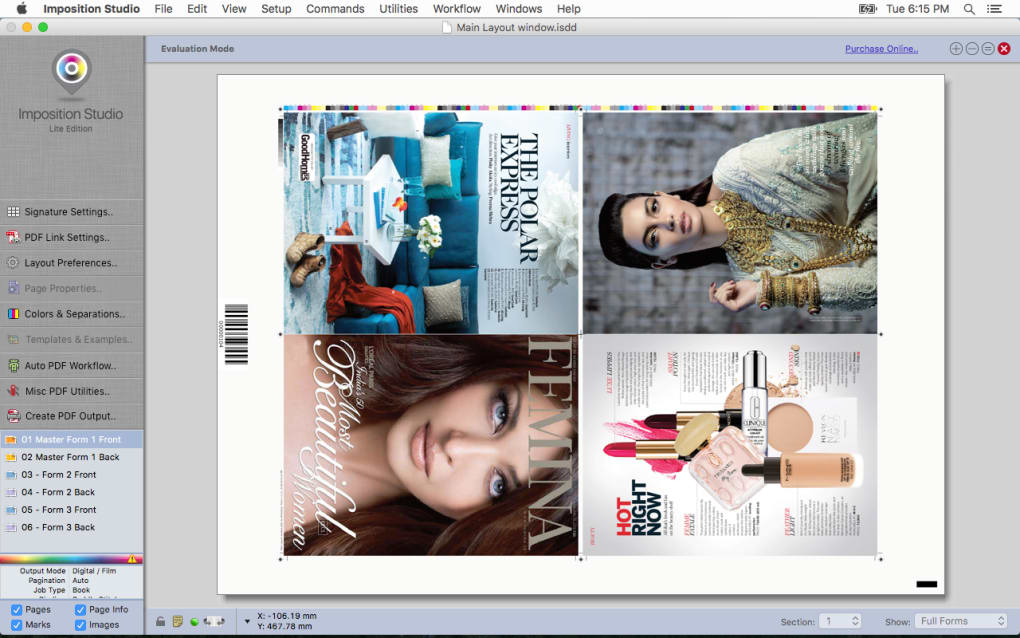
- 3D Imposition Visualization – Users can view layouts in a real-time 3D environment, enabling accurate assessment of how pages will fold and align when bound. This feature helps prevent misalignment and ensures that final prints meet design specifications.
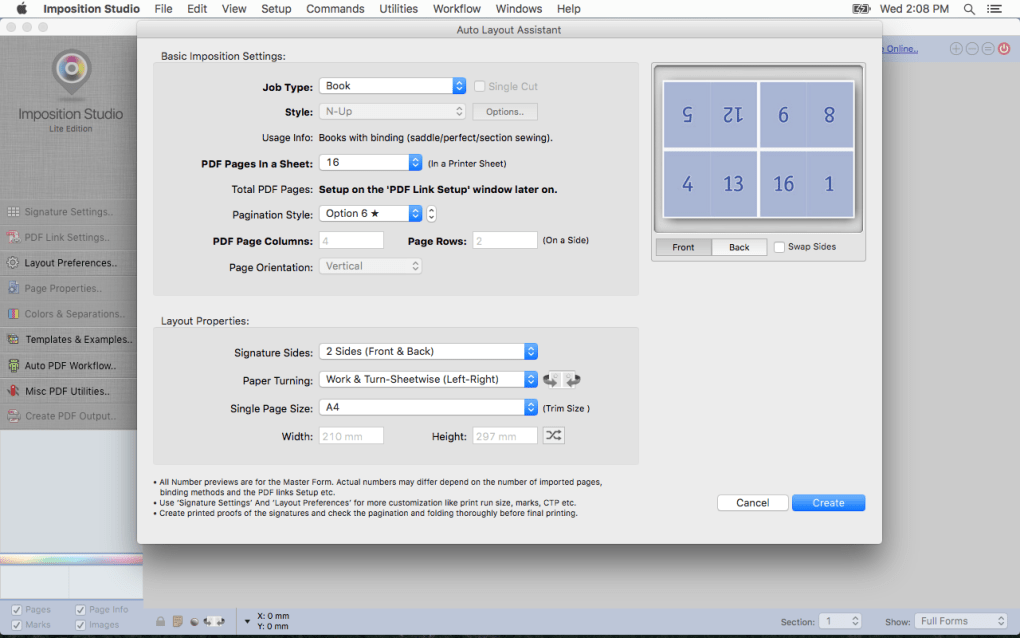
- Signature-Based Imposition – The software supports the creation of multi-page signatures, allowing efficient printing on large sheets that are folded and bound. This is essential for books and magazines with multiple sections.
- Custom Page Layout Templates – Designers can save and reuse layout configurations for recurring projects, improving consistency and reducing setup time across similar print jobs.
- Automated Page Sequencing – The tool intelligently arranges pages based on user-defined parameters such as binding type, paper size, and fold direction, minimizing manual intervention.
- Export to Print-Ready Formats – Output files are generated in standard formats compatible with professional printing equipment, ensuring seamless integration into existing production workflows.
These capabilities are especially useful in scenarios like preparing a 64-page magazine with four-page signatures, where correct imposition prevents misaligned spreads and wasted materials. The software’s ability to simulate physical binding processes digitally reduces the need for physical proofs, saving both time and resources in the design-to-print cycle.
User Interface, Workflow & Performance
Imposition Studio features a clean, modular interface designed for workflow efficiency, with toolbars, preview panels, and a customizable workspace. Navigation is intuitive, allowing users to switch between 2D layout views and 3D simulation modes with minimal clicks. The software supports drag-and-drop document import, and users can adjust imposition settings through clearly labeled controls.
Workflow efficiency is enhanced by the ability to preview changes in real time, with immediate visual feedback when modifying page order or folding patterns. The software maintains stable performance during complex operations, though exact resource usage details were not specified. General behavior suggests optimized handling of large document files, consistent with professional-grade design tools. The developer did not provide specific information on CPU or RAM consumption, nor did they detail crash rates or update frequency. However, the interface remains responsive during typical design sessions, indicating solid core stability.
Compatibility & System Requirements
Imposition Studio is available for both Windows and Mac operating systems, supporting a broad range of desktop environments used in professional design studios. The software has a file size of 120 MB, indicating a lightweight installation that should not strain system storage. It is compatible with current versions of Windows and macOS, though the developer did not specify exact OS versions or hardware requirements.
Exact system requirements were not listed, so users should ensure their machines meet general standards for running design software. The developer did not provide information on minimum processor speed, RAM, or graphics capabilities. Compatibility with external print devices or third-party design tools was also not detailed. Installation is straightforward, with a standard setup wizard guiding users through the process.
Pros and Cons
Pros
- Advanced 3D visualization for accurate print simulation
- Efficient signature-based imposition for book and magazine production
- Time-saving automation of complex page sequencing
- Support for reusable layout templates
- Lightweight installation at 120 MB
Cons
- No detailed system requirements provided
- Resource usage (CPU/RAM) not specified
- Limited public information about developer background
- Price point may be high for casual or freelance users
- Compatibility with older OS versions not confirmed
FAQ Section
Is Imposition Studio compatible with older versions of Windows and Mac?
Compatibility with older operating system versions was not specified by the developer. Users are advised to check system requirements upon installation.
Is the software safe to download and install?
Imposition Studio is distributed as a legitimate desktop application. Users should download it only from official sources to ensure security and avoid unauthorized modifications.
How often are updates released?
The developer did not provide information on update frequency. Users should monitor the official website for release notes and patches.
Does Imposition Studio require a perpetual license?
The software is offered at a one-time purchase price of $149.99, suggesting a perpetual license model. However, specific licensing terms were not detailed.
Can I use Imposition Studio offline?
Yes, the software is designed as a standalone desktop application and does not require an active internet connection after installation.
Final Thoughts
Imposition Studio delivers a focused, high-precision solution for professionals in print and book design. Its 3D imposition capabilities, automated sequencing, and template support make it a powerful tool for reducing errors and improving efficiency in complex print workflows. While system requirements and performance metrics are not fully disclosed, the software’s lightweight footprint and stable interface suggest reliable operation on modern workstations.
It is best suited for graphic designers, pre-press specialists, and publishers who regularly produce multi-page printed materials. The $149.99 price point reflects its professional-grade functionality, though it may be less accessible for hobbyists or small-scale users. Overall, Imposition Studio stands out as a specialized tool that addresses real industry challenges with clarity and purpose.
Download Imposition Studio now







